TableWidget
Detailed Description
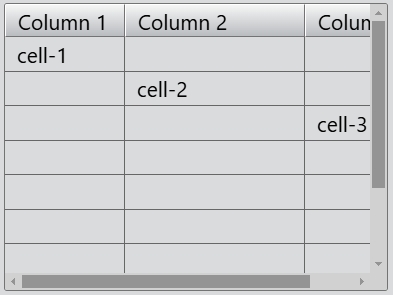
The TableWidget class provides standard table with a horizontal header for applications. The items in a table widget are provided by TableItem.
An item can be added with set(). The table can be cleared with the clear() function.
The number of rows in the table can be found with the rowCount property, and the number of columns with the columnCount property.
TableItem
The TableItem class is a single item in a table widget. Items usually contain text, icons, or checkboxes.
Event
The item click event is emitted with the specified item when a mouse button is clicked on an item in the widget.
The item double click event is emitted with the specified item when a mouse button is double clicked on an item in the widget.
The item context menu event is emitted with the specified item when a mouse button is right clicked on an item in the widget.
The selection change event is emitted whenever the selection changes.
// Listen for the item click event
tableWidget.bind('itemClicked', (event: ItemClickEvent): void => {
    event.item as TableItem; // The table item is clicked.
    event.point; // The position of the mouse pointer relative to the top-left corner of the page.
});
// Listen for the item double click event
tableWidget.bind('itemDoubleClicked', (event: ItemDoubleClickEvent): void => {
    event.item as TableItem; // The table item is double clicked.
    event.point; // The position of the mouse pointer relative to the top-left corner of the page.
});
// Listen for the item context menu event
tableWidget.bind('itemContextMenu', (event: ItemContextMenuEvent): void => {
    event.item as TableItem; // The table item is right clicked.
    event.point; // The position of the mouse pointer relative to the top-left corner of the page.
});
// Listen for the selection change event
tableWidget.bind('selectionChanged', (): void => {
    // The selection changes.
});
Example code
In the code below, you will create a table widget:
const desktop = Desktop.instance();
const tableWidget = new TableWidget(desktop);
tableWidget.columnCount = 3;
tableWidget.rowCount = 10;

const headerView = tableWidget.headerView;
headerView.addItem('Column 1');
headerView.addItem('Column 2');
headerView.addItem('Column 3');

tableWidget.setColumnWidth(0, 80);
tableWidget.setColumnWidth(1, 120);
tableWidget.setColumnWidth(2, 80);
tableWidget.setItem(0, 0, 'cell-1');
tableWidget.setItem(1, 1, 'cell-2');
tableWidget.setItem(2, 2, 'cell-3');